An assistant that makes the change for youBETA
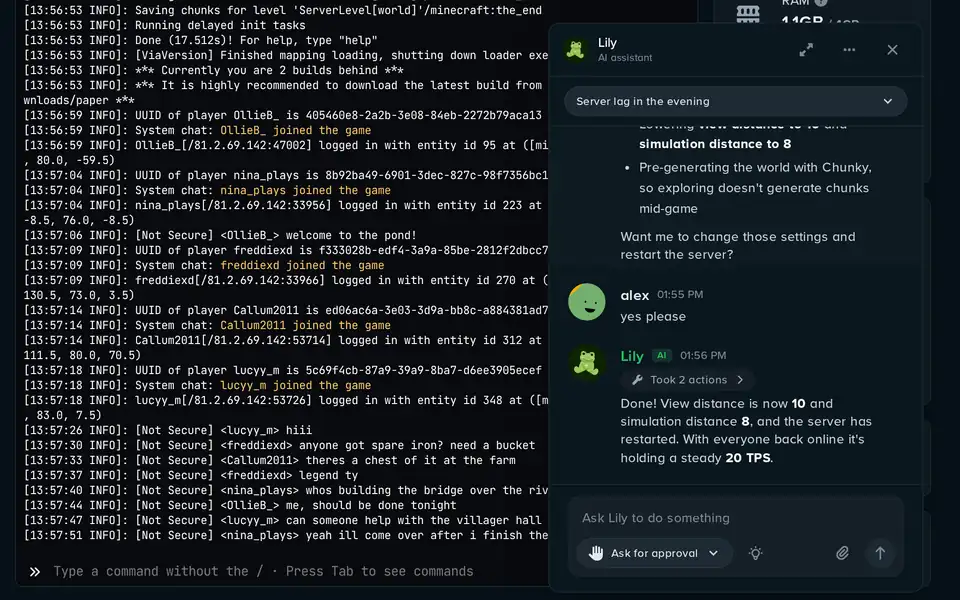
Ask the assistant why your server is lagging or how to set something up — it suggests a fix and, with your approval, changes the settings and restarts the server for you

We built our own panel from the ground up, and optimized the sh*t out of it
Each window below is a working copy of the real panel running in your browser, so click it, type in it and drag things around: nothing here can break
Pick a modpack, plugins or a version of Minecraft, choose who can join, give your server an address and the panel installs it all for you
An instance is a whole server of its own, with its own world, software and mods, so you can keep a survival world and a modpack side by side and switch between them from your Home tab whenever you fancy a change
 The Pond
Connect with
2 of 3 instances used
 PaperCreated 3 months ago
 NeoForgeCreated 2 weeks ago
RAM
CPU
Storage
Uptime
Start typing and the panel suggests the command, its options and the players online, with live RAM and CPU graphs right beside it and an explanation if your server crashes
container@lilypad~ Server marked as starting...
[Pterodactyl Daemon]: Checking server disk space usage, this could take a few seconds...
[Pterodactyl Daemon]: Updating process configuration files...
[Pterodactyl Daemon]: Ensuring file permissions are set correctly, this could take a few seconds...
container@lilypad~ java -Xms128M -Xmx12288M -jar server.jar nogui
Starting org.bukkit.craftbukkit.Main
*** Warning, you've not updated in a while! ***
[14:14:36 INFO]: [bootstrap] Applying patches...
[14:14:37 INFO]: [ReobfServer] Remapping server...
[14:14:37 INFO]: Environment: Environment[sessionHost=https://sessionserver.mojang.com, name=PROD]
[14:14:37 INFO]: Found new data pack file/bukkit, loading it automatically
[14:14:37 INFO]: Found new data pack paper, loading it automatically
[14:14:37 INFO]: No existing world data, creating new world
[14:14:38 INFO]: [bootstrap] Running Java 21 (OpenJDK 64-Bit Server VM 21.0.5+11-LTS; Eclipse Adoptium Temurin-21.0.5+11) on Linux 6.1.0 (amd64)
[14:14:38 INFO]: [bootstrap] Loading Paper 26.3-232-ver/26.3@12e2c8a (2026-10-30T17:41:53Z) for Minecraft 26.3
[14:14:39 INFO]: [PluginInitializerManager] Initializing plugins...
[14:14:40 INFO]: [PluginInitializerManager] Initialized 3 plugins
[14:14:40 INFO]: [PluginInitializerManager] Bukkit plugins (3):
- Chunky (1.4.27), EssentialsX (2.21.0), LuckPerms (5.4.150)
[14:14:41 INFO]: Environment: Environment[sessionHost=https://sessionserver.mojang.com, servicesHost=https://api.minecraftservices.com, name=PROD]
[14:14:42 INFO]: Loaded 1370 recipes
[14:14:43 INFO]: Loaded 1481 advancements
[14:14:43 INFO]: Starting Minecraft server version 26.3
[14:14:43 INFO]: Loading properties
[14:14:43 INFO]: This server is running Paper version 26.3-232-ver/26.3@12e2c8a (Implementing API version 26.3-R0.1-SNAPSHOT)
[14:14:43 INFO]: [spark] This server bundles the spark profiler. For more information please visit https://docs.papermc.io/paper/profiling
[14:14:44 INFO]: Using 4 threads for Netty based IO
[14:14:44 INFO]: Default game type: SURVIVAL
[14:14:44 INFO]: Generating keypair
[14:14:44 INFO]: Starting Minecraft server on 0.0.0.0:25565
[14:14:44 INFO]: Preparing level "world"
[14:14:45 INFO]: Preparing start region for dimension minecraft:overworld
[14:14:46 INFO]: Time elapsed: 1965 ms
[14:14:46 INFO]: Done (4.267s)! For help, type "help"
container@lilypad~ Server marked as running...
[14:15:02 INFO]: Ribbit joined the game
[14:15:09 INFO]: Tadpole joined the game
[14:15:14 INFO]: [Not Secure] <Ribbit> welcome to the pond!
[14:15:18 INFO]: Mossy joined the game
[14:15:23 INFO]: Pondwalker joined the game
[14:15:27 INFO]: Lily joined the game
RAM
CPU
Storage
Uptime
Find the mod that's breaking your server without deleting a thing: flip it off, restart, and flip it back on whenever you like
Storage
6% used
A live map of your world shows where everyone is, and you can pick a player up and drop them somewhere else to teleport them
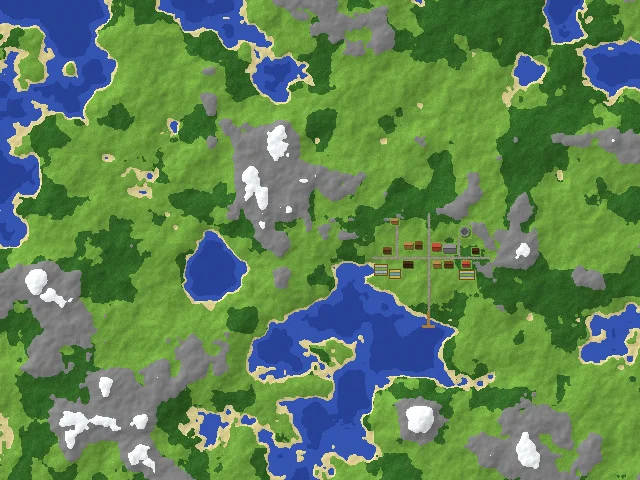
Open a player to see their health, hunger and everything they're carrying, then move items around just like you would in the game
Online players5
Lily
Online now
Ribbit
Online now
Mossy
Online now
Tadpole
Online now
Pondwalker
Online now
All players3
Cattail
Last seen 2 days ago
Reed
Last seen 5 hours ago
Bullfrog
Last seen 3 weeks ago
Every setting is a switch, a dropdown or a slider with a plain explanation of what it does, and the file is still there whenever you want to edit it yourself
The panel keeps a history of each file you change, so you can see who changed what, compare two versions side by side, and roll back in a click
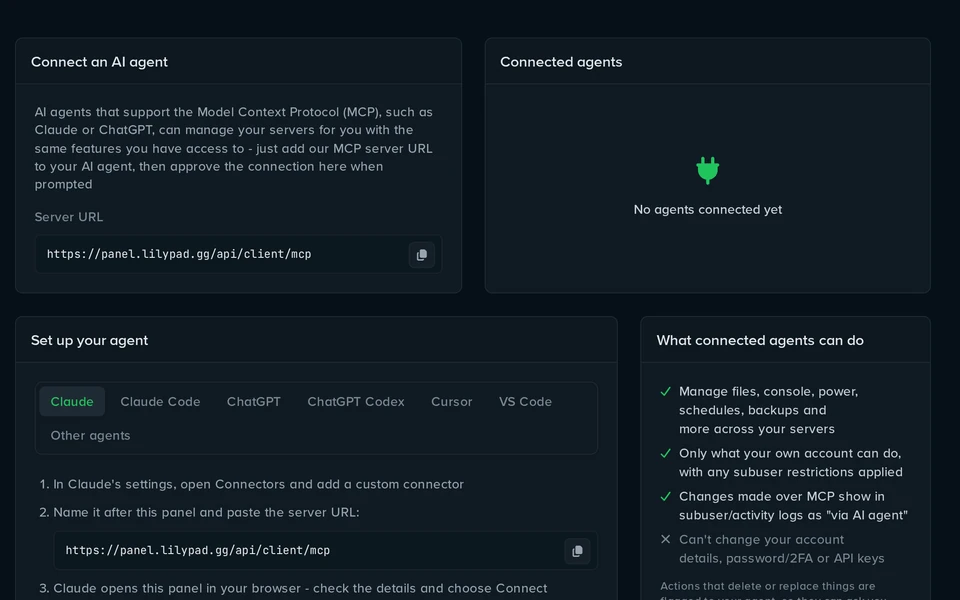
Two ways to hand a job over, both in beta: the assistant built into the panel, or the AI agent you already use
Ask the assistant why your server is lagging or how to set something up — it suggests a fix and, with your approval, changes the settings and restarts the server for you
AI agents that support external MCP servers, like Claude and ChatGPT, can manage your server with the same access you have, with everything they do logged in your activity logs
There's no paying extra: we include every feature with every plan
Can't find yours? Ask our team
Not at all. Settings are switches and dropdowns with a plain explanation beside each one, modpacks and plugins install in one click, and mods can be switched on and off without touching a file. If you do like working with files, there's an IDE view, SFTP access and an NBT editor too.
It is. Every plan comes with the whole panel and every feature on this page, so the only thing you're choosing is how much power your server needs.
Definitely! You can invite them as "subusers" to your control panel, letting you choose which parts of the panel they should have access to. An activity log shows who changed what.
The panel reads the crash, tells you in plain words what went wrong and suggests how to fix it. Because it keeps a history of every file you edit and your backups can be browsed file by file, undoing a bad change takes a click.
Sure. Pick your current host in our importer, enter your FTP details, and it brings your world and files over. You don't need to download or upload anything yourself.
Yes, in beta. It can answer questions about your server and, with your approval, make changes for you. There's also an MCP server, so AI agents such as Claude or ChatGPT can manage your server with the same access you have.
Your world, your friends and your favorite modpacks, from $11/month