
Which anticheat is best for my Minecraft server?
3 min read
On this page
No anticheat plugin will ever be 100% accurate, but there are certainly some which are renowned to be more accurate than others. We’ll outline some of the most popular ones below, and both of them support plugin-based Minecraft versions (e.g. Paper) 1.8 through to the latest. They won’t, however, work on modded server versions like Forge or Fabric.
We don’t recommend auto-banning players who trigger anticheats as there can be many reasons why the player could potentially be falsely flagged. These include:
- The player could be experiencing high latency/ping, which causes them to “rubberband” (teleport around) and flag the anticheat – see bottom of this article
- The server could be experiencing lag, which can be checked by installing Spark and running
spark healthto view TPS - The player could have certain client-side mods enabled which could falsely flag the anticheat
- The anticheat might be interpreting the player’s actions wrongly, which can lead to a false flag
Instead, we suggest having your staff team closely monitor any players who are consistently flagged for cheating. It can then be at their discretion (rather than a piece of software’s) as to whether to punish the player or not.
🌋 Vulcan (Paid)
Purchase on SpigotMC
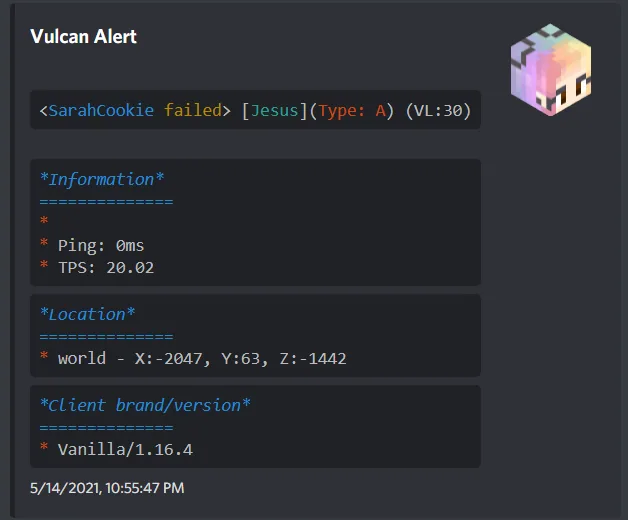
Vulcan is commonly regarded to be the most reliable anticheat at the moment, at a relatively low price point and typically producing a low rate of false positives. It’s easy to configure and even has a Discord integration which allows your staff to be notified when they’re not online about potential cheaters:
☠️ Grim (Free)
Download on SpigotMC or GitHub
Grim is one of the latest anticheats and has a “1:1 simulation of the player’s possible movements”, allowing it to effectively detect some movement and combat cheats. As with all anticheats, it has its bugs, but seems to be well reviewed – especially for a completely free plugin! Grim also has a Discord webhook system similar to Vulcan’s.
How can I tell if a player has high latency/ping?
You can use Spark to view a player’s ping with the /spark ping --player <username> command, and it’ll return a value in “ms” (milliseconds). Here’s what ping typically indicates:
- < 75ms – player has near-instant response from the server, giving a great advantage in PvP
- 75-120ms – player has slightly higher ping which isn’t perfect for PvP, but still feels very smooth
- 120-180ms – player may struggle in PvP situations but can play survival gamemodes
- 180ms-250ms – very noticeable lag which can heavily impact gameplay and hurt the experience
- 250ms+ – practically unplayable, user has network issues or is on the opposite side of the world!
However, high ping from a user cannot rule out the fact that they may be cheating. A technique used by cheaters called “ping spoofing” allows them to fake having high ping, making server owners consider that their irregular movement/combat may be due to the player’s lag.
More Minecraft guides
- Download your Minecraft server's files
- What mods do you pre-install on my Fabric server?
- Create and use a MySQL database on your server
- Which Minecraft proxy software is the best?
- Getting started with your Velocity proxy
- Connect your Minehut external server to Lilypad
Still stuck?
Just get in touch! We're happy to help with any issues
Something not working? Check our status page to see if it's on our end