
Getting started with your Velocity proxy
2 min read
On this page
Lilypad provides top-of-the-line hardware, making us perfect for Minecraft networks who need the best performance. We’ve made it simple to set up a Velocity-based network on our servers — just follow the steps below:
What will you need?
- 2 or more Paper-based Minecraft servers on the latest Minecraft version
- A proxy server, which we can provide for free if you contact support
Setting up your network
-
Head to our game panel at panel.lilypad.gg and select your proxy server, then go to the Files tab and open the
velocity.tomlfile. -
Scroll down to the
[servers]section and set up your backend servers’ names and addresses as appropriate. The names are what players will connect with using the/servercommand, e.g./server lobby, and the addresses will need to be the new IP and ports your backend servers have been given, beginning with172.18.0.1.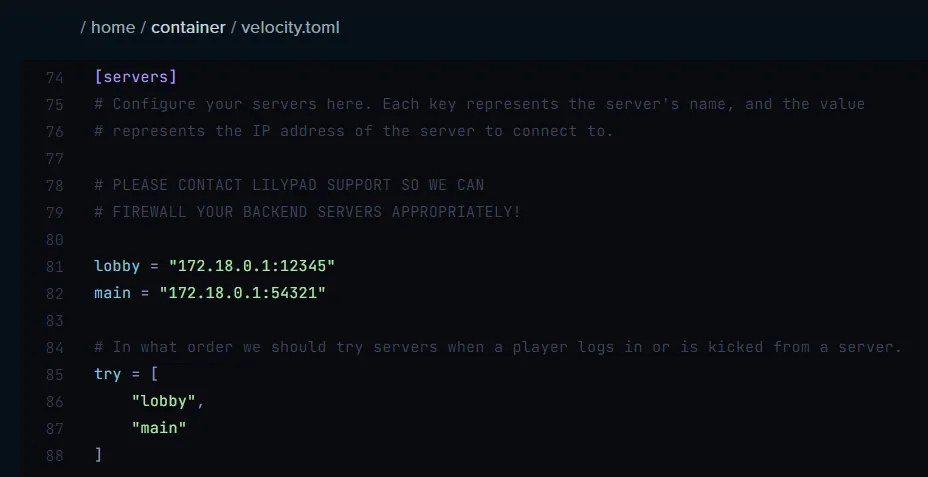
-
Copy the text inside the
forwarding.secretfile on your proxy, as this will be needed to allow your proxy to communicate securely with your backend servers.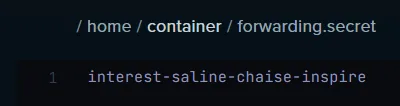
-
Restart your proxy to load in the new configuration.
-
Visit each of your backend servers in the panel, and follow the below process to configure them for use with the proxy:
-
Open
server.propertiesand setonline-modetofalse, andnetwork-compression-thresholdto-1(so player connections aren’t compressed twice) -
Open
config/paper-global.yml, scroll down to thevelocitysection and setenabledtotrue,online-modetotrueand then paste in the forwarding secret you copied earlier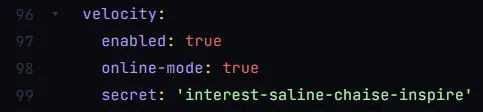
-
If you have Geyser installed on the server, remove it (but keep Floodgate) and install/configure Geyser-Velocity + Floodgate-Velocity on the proxy instead — you will need to copy the
key.pemfrom the proxy to the backend servers -
If you are running a Fabric backend server, install FabricProxy-Lite and follow its instructions for setup
-
-
You should be good to go! Get in touch if you run into any issues while getting things set up.
More Minecraft guides
- Getting started with your Minecraft server
- Which Minecraft server software is right for me?
- Install a modpack on your Minecraft server
- Upload mods/plugins to your Minecraft server
- Change the software/version on your Minecraft server
- Transfer your server from another provider
Still stuck?
Just get in touch! We're happy to help with any issues
Something not working? Check our status page to see if it's on our end