
Give other users access to your control panel
1 min read
You don’t have to manage your server alone! Thanks to Lilypad’s powerful control panel, you can invite your friends or staff team to access your server’s console, files and settings. It’s as simple as following the steps below:
-
Head to our game panel at panel.lilypad.gg and select your server.
-
Click the Subusers button in the sidebar, then Create Subuser on the right.
-
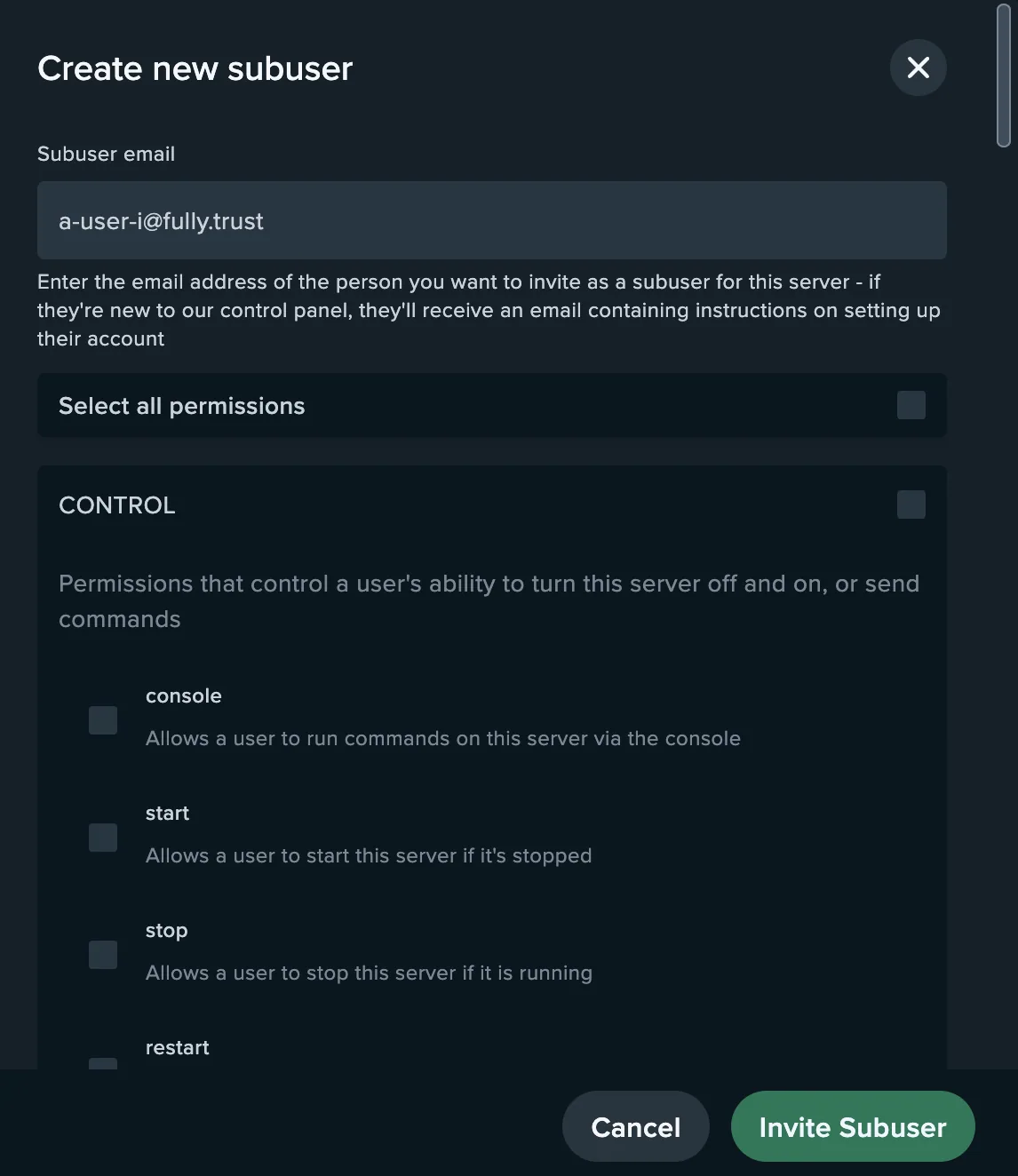
Paste the email address of the user you want to invite. Select the permissions they should have access to, or Select all permissions if you fully trust them. Keep in mind this will allow them to wipe all your server’s files, including any backups!
-
Press Invite Subuser and the user will receive an email prompting them to set up an account on the Lilypad control panel, where they can manage your server with the restrictions you have set. If they don’t receive an email after 5-10 minutes, double-check you entered their email correctly and ask them to check their Spam/Junk folder. Contact us if there are any further issues.
More Minecraft guides
- Set up automatic restarts for your Minecraft server
- Add a resource pack to your Minecraft server
- Add a datapack to your Minecraft server
- Link your Minecraft chat to a Discord server
- Which anticheat is best for my Minecraft server?
- Access your server’s files with SFTP
Still stuck?
Just get in touch! We're happy to help with any issues
Something not working? Check our status page to see if it's on our end