
Point a custom domain to your Minecraft server
1 min read
A domain like lilypad.gg (or, in the case of an actual server, hypixel.net) can make your server look much more professional to potential players, and is easier to share than a traditional IP and port like 66.118.235.132:25565 – luckily, we’ve made the process of pointing a domain to your server easy.
-
Log in to your domain’s control panel and head to the page where you can manage DNS records. This might sometimes be called “Custom DNS” or just “DNS”.
-
Create an A record with the following information:
- Type: A
- Name: The bit before the domain, such as
playif you want your server address to beplay.yourdomain.com– if you want players to connect via the root domain likeyourdomain.com, most providers will require you to simply set this to@ - Address: Your server’s IP address, excluding the port (for example,
66.118.235.132)

-
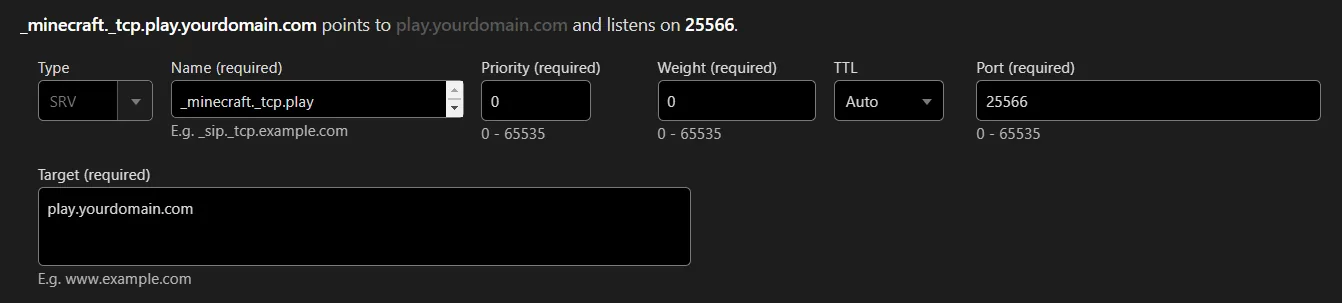
Create an SRV record with the following information if your server’s port is not 25565:
- Type: SRV
- Name:
_minecraft._tcp.play(assuming your subdomain isplay– just use_minecraft._tcpif you’re using the root domain) - Priority:
0 - Weight:
0 - Port: Your server’s 5-digit port (for example,
25566) - Target: The full address which players will now connect with, such as
play.yourdomain.com
Your custom domain should now work! Please note this may, in some cases, take up to 24 hours to take effect. If it’s still not working, feel free to get in touch and we’ll take a look.
More Minecraft guides
- Set up automatic backups for your Minecraft server
- Set up automatic restarts for your Minecraft server
- Add a resource pack to your Minecraft server
- Add a datapack to your Minecraft server
- Link your Minecraft chat to a Discord server
- Which anticheat is best for my Minecraft server?
Still stuck?
Just get in touch! We're happy to help with any issues
Something not working? Check our status page to see if it's on our end